Stop Command Injection: Practical Prevention Measures That Work
Input validation fails because context matters; you must escape data for the specific shell parser or use language-native APIs that bypass the shell entirely.
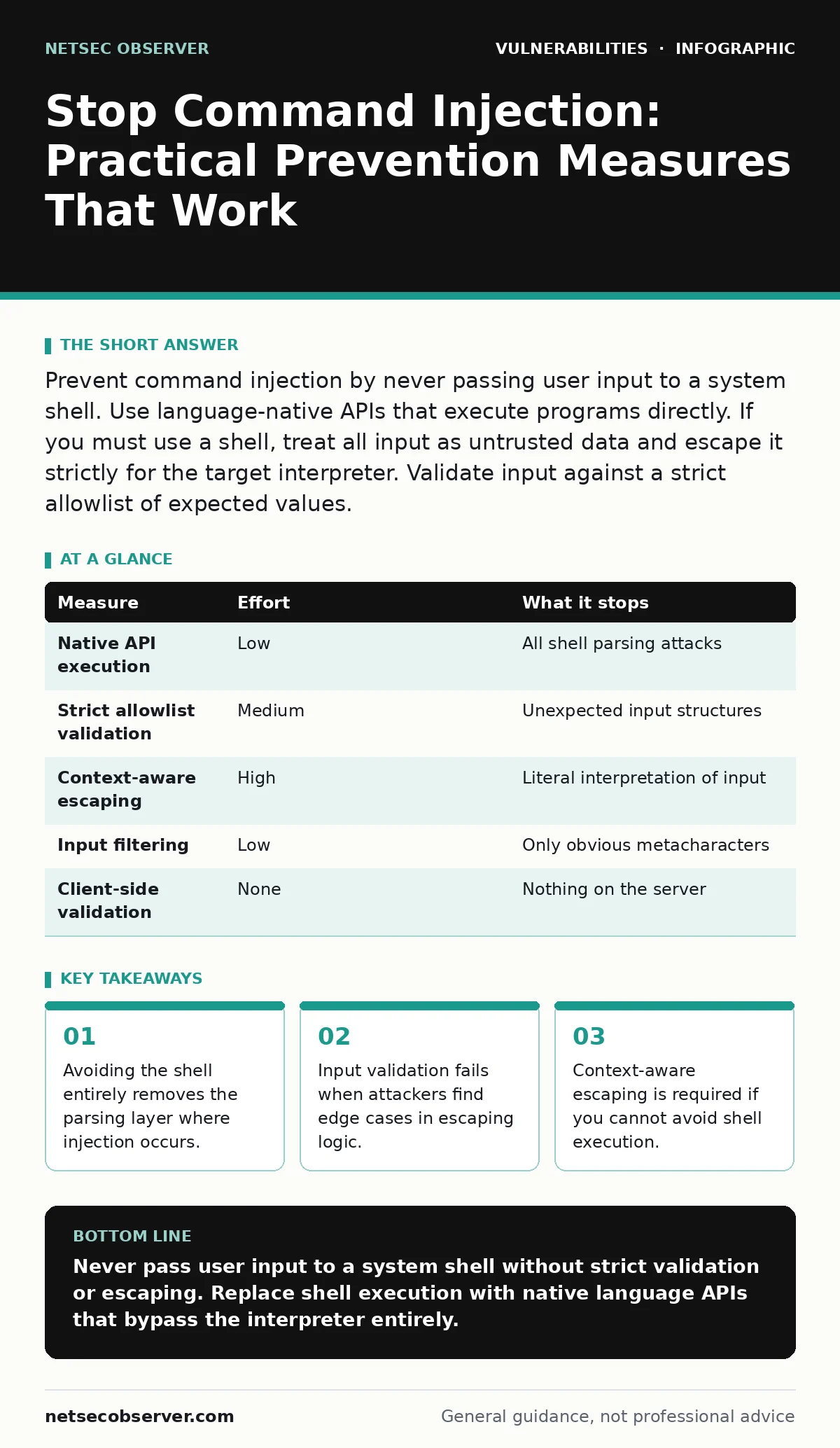
Prevent command injection by never passing user input to a system shell. Use language-native APIs that execute programs directly. If you must use a shell, treat all input as untrusted data and escape it strictly for the target interpreter. Validate input against a strict allowlist of expected values.
The Shell Is the Attack Surface
Command injection occurs when an application sends untrusted data to a system shell. The shell interprets that data as instructions rather than simple text. This happens because the application trusts the input too much. It assumes the input is just a filename or a parameter. The attacker provides a string that includes shell metacharacters. These characters tell the shell to execute additional commands.
Imagine a tool that pings a host provided by a user. The user enters 8.8.8.8; cat /etc/passwd. The application builds a command string. It sends this string to the operating system shell. The shell runs the ping command. It then sees the semicolon. The semicolon is a command separator. The shell then executes the next command. This second command reads sensitive files. The application intended only to ping. The shell executed both commands.
The root cause is not the user input. The root cause is the use of the shell as an intermediary. The shell is designed to interpret complex strings. It is not designed to handle untrusted data safely. When you pass data through a shell, you inherit the shell’s parsing rules. Those rules are complex and full of edge cases. You cannot easily predict how the shell will parse every possible input.
Avoid the Shell Entirely
The most effective prevention is to bypass the shell. Most modern programming languages offer native functions to execute programs. These functions do not invoke a shell interpreter. They call the operating system kernel directly. This direct call passes arguments as distinct data structures. The kernel treats each argument as a single string. It does not parse the string for metacharacters.
In Python, you might use subprocess.run with a list of arguments. You pass the command and its arguments as separate items in a list. The system executes the command. It passes the arguments exactly as provided. It does not look for pipes or semicolons. This method is safer because there is no parsing layer. The data remains data. It never becomes code.
This approach works for most standard operations. You can run external tools, scripts, or utilities. You just need to ensure you use the correct API. Many developers default to shell execution out of habit. They think they need the shell for complex tasks. They often do not. Native APIs handle complex arguments just as well. They do so without the risk of injection.
Validate Against a Strict Allowlist
If you cannot avoid the shell, you must validate the input. Validation means checking the input against a known set of safe values. An allowlist defines exactly what is permitted. Everything else is rejected. This is different from a blocklist. A blocklist tries to stop known bad characters. Attackers can often find ways to bypass blocklists.
An allowlist is much harder to bypass. You define the structure of the input. If the input is an IP address, you check that it matches an IP format. If it is a username, you check that it contains only alphanumeric characters. You reject any input that deviates from this pattern. This ensures that the input cannot contain shell metacharacters. It cannot contain command separators.
This method requires careful design. You must understand the expected input fully. If you allow too much, you leave room for injection. If you allow too little, you break functionality. You must balance security with usability. But for command injection, security must come first. A strict allowlist removes the risk of unexpected parsing. It ensures the shell only sees what you expect it to see.
Escape Input for the Specific Context
If you must use a shell and cannot use an allowlist, you must escape the input. Escaping means encoding special characters so the shell treats them as literal text. This is complex because escaping rules vary by shell. Bash, PowerShell, and cmd.exe all have different rules. You must know which shell you are using. You must apply the correct escaping logic for that shell.
Escaping is error-prone. It is easy to miss a character. It is easy to apply the wrong escaping method. If you escape for Bash but the system uses PowerShell, you fail. If you escape for one version of Bash but the system uses another, you fail. This makes escaping a fragile defense. It requires deep knowledge of shell syntax. It requires constant maintenance as shells evolve.
What Does Not Work
Many developers rely on input filtering to prevent injection. Filtering tries to remove or block dangerous characters. This approach fails because attackers can encode input. They can use hexadecimal, octal, or Unicode representations. They can use variable expansion. They can use command substitution. Filtering cannot catch every possible encoding. It cannot catch every possible syntax trick.
Another common mistake is trusting the front end. You might validate input in the browser. You might block dangerous characters in JavaScript. This does not protect the server. Attackers can bypass the browser. They can send requests directly to the server. They can use tools like curl or Postman. The server must validate its own input. It must not trust any client-side validation.
Compare Prevention Measures
The table below ranks measures by effectiveness. It shows how much risk each measure removes. It also shows the effort required to implement it.
| Measure | Effort | What it stops |
|---|---|---|
| Native API execution | Low | All shell parsing attacks |
| Strict allowlist validation | Medium | Unexpected input structures |
| Context-aware escaping | High | Literal interpretation of input |
| Input filtering | Low | Only obvious metacharacters |
| Client-side validation | None | Nothing on the server |
Native API execution is the best measure. It stops all shell parsing attacks. It requires low effort to implement. Strict allowlist validation is the next best. It stops unexpected input structures. It requires medium effort to design correctly. Context-aware escaping is risky. It requires high effort to get right. It stops literal interpretation of input. Input filtering is weak. It stops only obvious metacharacters. Client-side validation is useless for server security. It stops nothing on the server.
Checklist for Today
You can improve your security posture today. Start with these three actions. They address the most common weaknesses. They are practical and immediate.
- Audit your code for shell execution functions. Identify where user input reaches the shell.
- Replace shell execution with native APIs. Use list-based argument passing.
- Implement strict input validation. Define allowlists for all external input.
These steps reduce your risk significantly. They remove the most dangerous attack vectors. They are easier to maintain than complex escaping logic. They provide a solid foundation for secure coding. You can build on this foundation later. But start here. Start with the basics. Start with the surest defenses.
Related Security Concepts
Command injection is one of many input-related vulnerabilities. It shares similarities with other injection flaws. For example, SQL injection targets database queries. The principles of prevention are similar. You avoid dynamic query construction. You use parameterized queries. You validate input against allowlists. Understanding SQL injection helps you understand command injection. Both involve trusting untrusted data.
Another related concept is server-side request forgery (SSRF). SSRF allows an attacker to make requests from the server. The server acts on behalf of the attacker. This can expose internal services. It can read internal files. Preventing SSRF involves validating URLs. It involves restricting outbound connections. It involves using allowlists for destinations. These practices complement command injection prevention.
You should also consider exposure management. This involves identifying all your attack surfaces. You map your inputs. You trace how they flow through your system. You identify where they reach the shell. This visibility helps you prioritize your fixes. It helps you find hidden injection points. It ensures you do not miss critical vulnerabilities.
Finally, remember that dependencies matter. You might use libraries that execute commands. These libraries might have vulnerabilities. You must keep your dependencies updated. You must monitor for new issues. Dependency updates can fix underlying injection flaws. They can patch unsafe execution methods. They are part of a holistic security strategy.
Key takeaways
- Avoiding the shell entirely removes the parsing layer where injection occurs.
- Input validation fails when attackers find edge cases in escaping logic.
- Context-aware escaping is required if you cannot avoid shell execution.
Never pass user input to a system shell without strict validation or escaping. Replace shell execution with native language APIs that bypass the interpreter entirely.
Frequently asked questions
Is command injection the same as remote code execution?
Command injection is a technique. Remote code execution is the result. Command injection can lead to remote code execution if the attacker can run arbitrary commands.
Can I use a blocklist to stop command injection?
No. Blocklists are incomplete. Attackers can bypass them using encoding or alternative syntax. Allowlists are safer because they define what is allowed, not what is blocked.
Does HTTPS prevent command injection?
No. HTTPS encrypts data in transit. It does not validate data content. Command injection happens when the server processes the data. Encryption does not stop malicious data from being processed.
What if I need to run complex shell scripts?
Avoid passing user input to the script. Pass static scripts. Pass user input as environment variables or file arguments. Validate these inputs strictly. Do not let user input control the script logic.
How this guide was produced: written by the NetSec Observer editorial team with AI assistance, checked against the public references listed below, and reviewed when the facts change. See our editorial policy or report an error.