DNS Tunneling Mistakes: How to Close These 7 Gaps in Your Network
Attackers bypass firewalls by hiding data inside standard domain name queries, exploiting the fact that most networks allow unrestricted outbound DNS traffic.
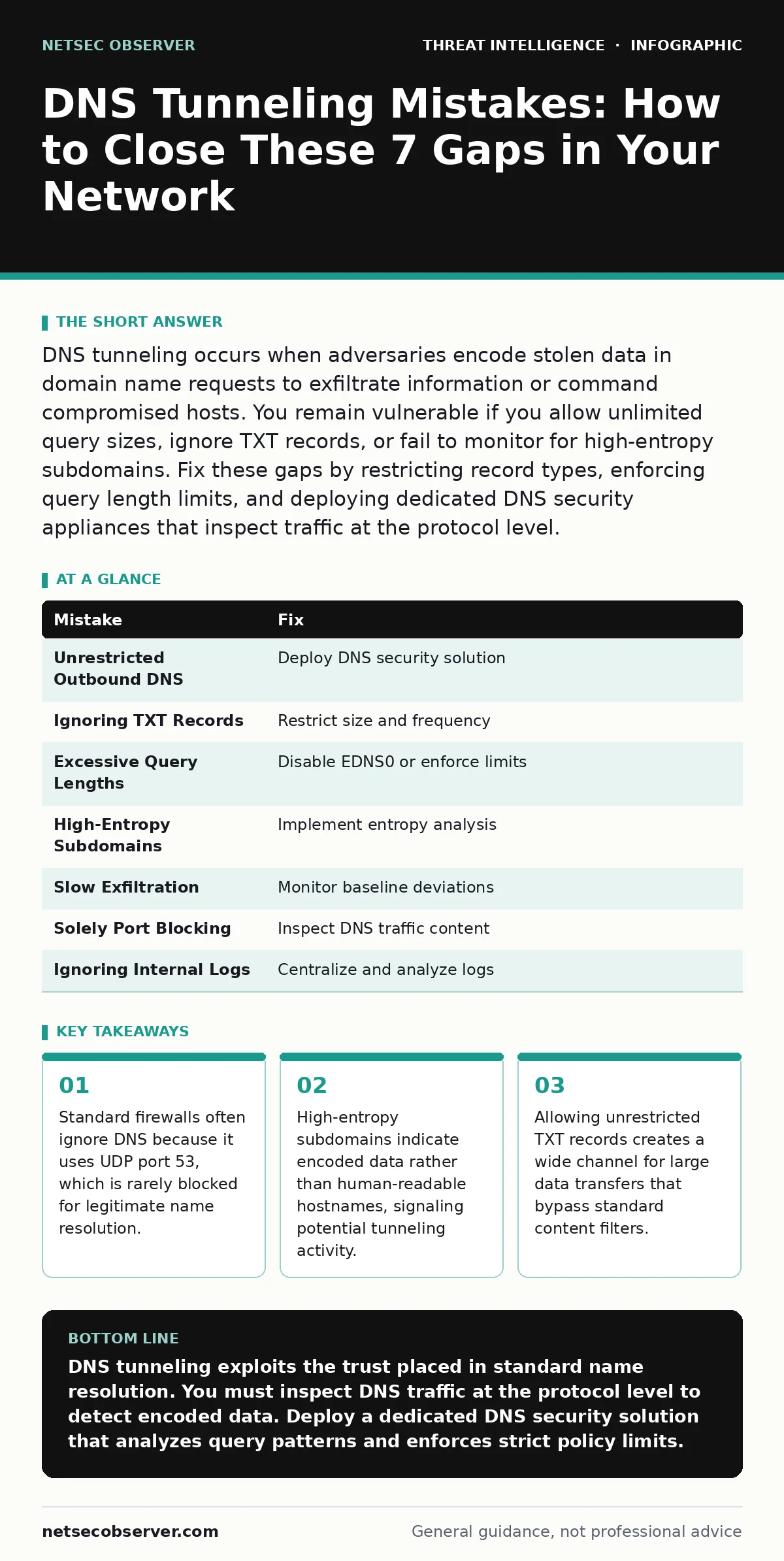
DNS tunneling occurs when adversaries encode stolen data in domain name requests to exfiltrate information or command compromised hosts. You remain vulnerable if you allow unlimited query sizes, ignore TXT records, or fail to monitor for high-entropy subdomains. Fix these gaps by restricting record types, enforcing query length limits, and deploying dedicated DNS security appliances that inspect traffic at the protocol level.
Mistake 1: Allowing Unrestricted Outbound DNS Traffic
Network administrators often assume that blocking inbound connections is sufficient for perimeter security. They forget that DNS queries travel outbound by design. Attackers exploit this by using the compromised host to send data out through the DNS protocol. This traffic looks like normal name resolution to standard firewalls. The connection remains open because the network expects responses from authoritative servers.
Why it hurts:
You create a covert channel that bypasses egress filtering. The attacker does not need to open new ports. They use the existing, trusted DNS path. Data leaves your network inside standard query packets. Your firewall logs show only legitimate DNS traffic. You lose visibility into the volume and content of the exfiltrated data.
The fix:
Deploy a dedicated DNS security solution that inspects queries before they leave the network. This tool can block requests to known malicious domains. It also identifies suspicious patterns in real time. Do not rely on your perimeter firewall for deep packet inspection of DNS. Use a proxy or forwarder that enforces policy. See how a threat intelligence program helps you identify these malicious domains early.
Mistake 2: Ignoring TXT Record Abuse
Many organizations block common file transfer protocols but leave DNS text records open. TXT records are designed to hold arbitrary text data. Attackers use them to carry large payloads. They split stolen data into multiple text strings. Each string becomes a subdomain in a DNS query. The server receives the data fragments and reassembles them. This method avoids binary data detection.
Why it hurts:
TXT records allow high-bandwidth data exfiltration. They bypass filters that look for executable files or scripts. The data appears as harmless text. Your security tools may not flag long text strings as dangerous. You lose the ability to detect large data leaks. The attacker maintains a persistent connection without triggering alerts.
The fix:
Restrict the size and frequency of TXT record queries. Block TXT records from internal servers unless explicitly required for services like SPF or DKIM. Monitor for unusually long TXT responses. Implement rate limiting for TXT queries per host. This reduces the window for data theft. It forces attackers to use slower, more detectable methods.
Mistake 3: Permitting Excessive Query Lengths
Standard DNS queries have a maximum length of 253 characters for the domain name. Some implementations allow longer queries via EDNS0 extensions. Attackers exploit this by encoding data in long subdomains. They pack more bits into each query. This increases the efficiency of the tunnel. Standard tools may truncate or ignore these long queries. They fail to log the full content.
Why it hurts:
You lose the ability to inspect the full payload. The attacker hides data in the extended portion of the query. Your logs show only the beginning of the domain. You cannot reconstruct the stolen data. The tunnel operates with higher throughput. Detection becomes difficult because the traffic looks like valid extended DNS.
The fix:
Disable EDNS0 if your environment does not require it. Enforce strict length limits on subdomains. Reject queries that exceed standard character counts. Log the full query string for analysis. This prevents attackers from using length as a hiding mechanism. It ensures that all queries fit within standard inspection capabilities.
Mistake 4: Failing to Detect High-Entropy Subdomains
Human-readable domain names follow predictable patterns. They use common words and short strings. Encoded data looks random. It contains a mix of letters, numbers, and symbols. This randomness creates high entropy. Attackers use base64 or hex encoding to transform data. The resulting subdomains look like gibberish. They stand out from normal browsing traffic.
Why it hurts:
You miss the visual signature of tunneling. Standard keyword filters do not catch random strings. The traffic blends in with legitimate dynamic DNS or IoT devices. You cannot distinguish between noise and malicious activity. The attacker continues to exfiltrate data. Your detection systems remain blind to the encoded content.
The fix:
Implement entropy analysis on DNS queries. Flag subdomains that exceed a certain randomness threshold. Compare query patterns against baseline behavior. Use machine learning models to identify anomalies. This catches encoded data before it leaves the network. It provides an early warning sign of compromise.
Mistake 5: Overlooking Slow and Low Exfiltration
Attackers do not always rush data out. They may use slow and low techniques. They send small amounts of data over long periods. This avoids triggering volume-based alerts. The tunnel remains active for weeks or months. It blends in with background noise. Administrators assume the lack of spikes means safety.
Why it hurts:
You underestimate the persistence of the threat. Small data leaks accumulate over time. They can reveal sensitive intellectual property. The attacker maintains access without detection. Your metrics show normal traffic levels. You fail to correlate small events into a larger attack.
The fix:
Monitor for consistent baseline deviations. Look for hosts that send DNS queries at regular intervals. Track the total volume of DNS traffic per user. Set alerts for sustained low-level activity. This detects slow tunnels that volume checks miss. It requires long-term logging and analysis. See how security metrics can help you define these baselines.
See also: How to Implement Security Metrics: A Step-by-Step Guide
Mistake 6: Relying Solely on Port Blocking
Some administrators block all traffic except standard web ports. They assume this stops data exfiltration. DNS uses port 53 for UDP and TCP. It is rarely blocked. Attackers use this open port to tunnel data. They do not need to bypass port filters. They simply use the allowed channel. This mistake is common in strict perimeter designs.
Why it hurts:
You create a false sense of security. The firewall blocks unauthorized ports but ignores DNS. The attacker uses the one open door. Data flows freely through DNS queries. Your port blocking strategy fails to address protocol-level abuse. You remain vulnerable to tunneling attacks.
The fix:
Inspect DNS traffic regardless of port status. Do not assume that port filtering is sufficient. Deploy deep packet inspection for DNS. Monitor for unusual query patterns on port 53. This ensures that the open port does not become a backdoor. It aligns your security with actual traffic behavior.
Mistake 7: Ignoring Internal DNS Server Logs
Internal DNS servers generate detailed logs. These logs contain query sources and destinations. Many organizations do not collect or analyze them. They focus only on external threats. Attackers use internal servers to resolve domains. They leave traces in the logs. Ignoring these logs hides the scope of the attack.
Why it hurts:
You lose critical context about the attack. You cannot identify the compromised host. You cannot trace the domain used for tunneling. The investigation stalls without internal logs. You miss the connection between the user and the malicious domain. This delays containment and remediation.
The fix:
Centralize DNS logs from all internal servers. Retain them for long-term analysis. Correlate internal logs with external threat feeds. Use user and entity behavior analytics to spot anomalies. This provides a complete view of DNS activity. It enables faster detection and response.
| Mistake | Fix |
|---|---|
| Unrestricted Outbound DNS | Deploy DNS security solution |
| Ignoring TXT Records | Restrict size and frequency |
| Excessive Query Lengths | Disable EDNS0 or enforce limits |
| High-Entropy Subdomains | Implement entropy analysis |
| Slow Exfiltration | Monitor baseline deviations |
| Solely Port Blocking | Inspect DNS traffic content |
| Ignoring Internal Logs | Centralize and analyze logs |
Key takeaways
- Standard firewalls often ignore DNS because it uses UDP port 53, which is rarely blocked for legitimate name resolution.
- High-entropy subdomains indicate encoded data rather than human-readable hostnames, signaling potential tunneling activity.
- Allowing unrestricted TXT records creates a wide channel for large data transfers that bypass standard content filters.
DNS tunneling exploits the trust placed in standard name resolution. You must inspect DNS traffic at the protocol level to detect encoded data. Deploy a dedicated DNS security solution that analyzes query patterns and enforces strict policy limits.
Frequently asked questions
Can DNS tunneling bypass a next-generation firewall?
Yes, if the firewall does not perform deep packet inspection on DNS. Standard firewalls often allow DNS traffic without analyzing the payload.
How do I distinguish between legitimate dynamic DNS and tunneling?
Legitimate dynamic DNS uses predictable patterns and low entropy. Tunneling uses high-entropy, random subdomains with consistent query intervals.
Is blocking port 53 a viable solution?
No, blocking port 53 breaks internet connectivity. You must inspect and filter DNS traffic instead of blocking the port entirely.
What role does threat intelligence play in detecting DNS tunneling?
Threat intelligence provides lists of known malicious domains. It helps you block queries to these domains before data exfiltration occurs.
How this guide was produced: written by the NetSec Observer editorial team with AI assistance, checked against the public references listed below, and reviewed when the facts change. See our editorial policy or report an error.