DLL Hijacking Response: Containment, Recovery, and Prevention Steps
The most dangerous moment in a DLL hijack response is not the initial infection, but the automatic re-execution of the malicious library when you restart a service to test stability.
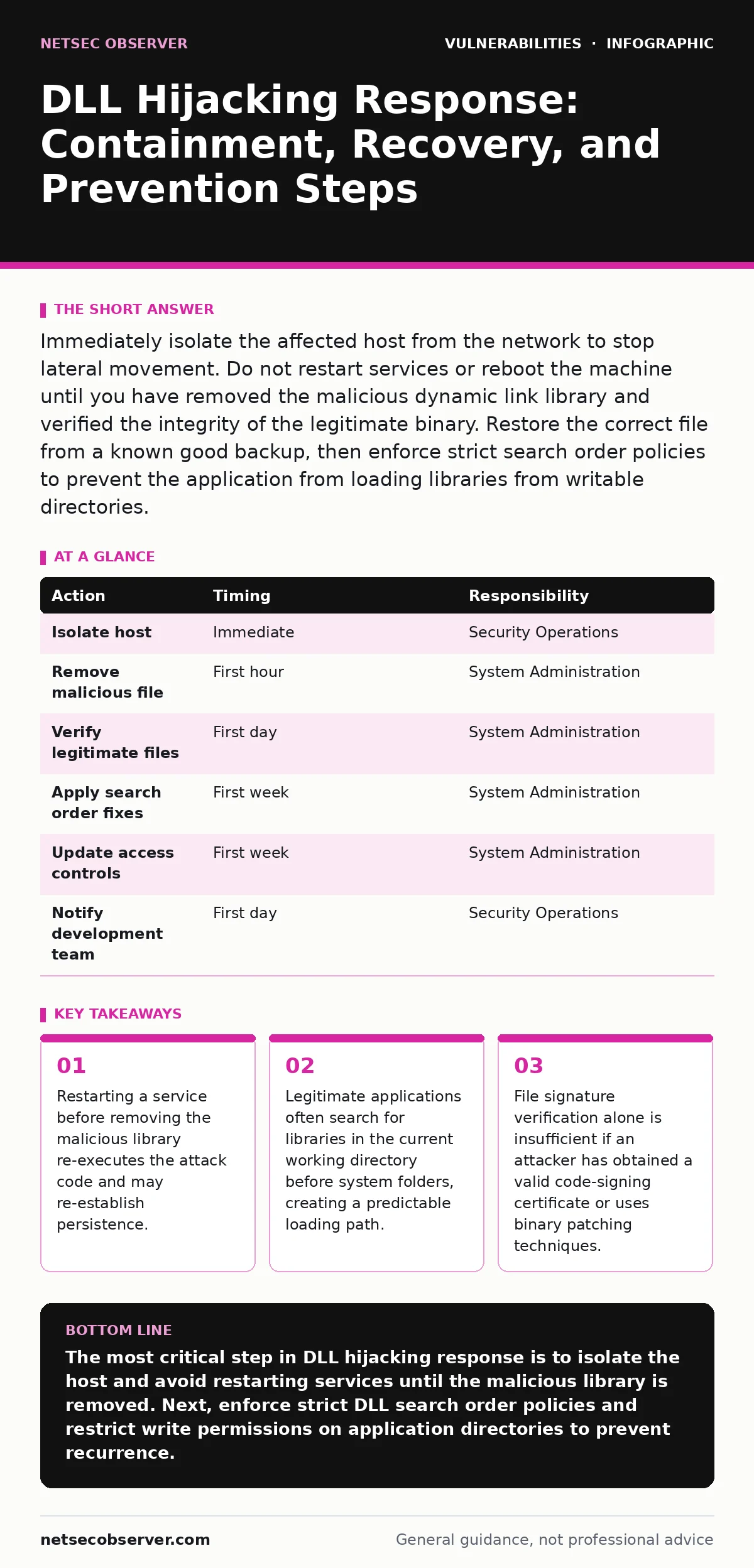
Immediately isolate the affected host from the network to stop lateral movement. Do not restart services or reboot the machine until you have removed the malicious dynamic link library and verified the integrity of the legitimate binary. Restore the correct file from a known good backup, then enforce strict search order policies to prevent the application from loading libraries from writable directories.
First hour
A dynamic link library (DLL) hijacking attack occurs when a malicious file masquerades as a legitimate library required by an application. The operating system loads this fake file because it finds it before the real one in the search path. You are now dealing with active code execution that may have already escalated privileges or established persistence. Your immediate goal is to stop the spread, not to fix the root cause.
- Isolate the host from the network immediately. Disconnect Ethernet cables or disable Wi-Fi adapters. This prevents the attacker from using the compromised machine to pivot to other systems.
- Identify the affected process. Use task manager or similar system tools to find the application that loaded the suspicious library. Note the process ID and the full path of the executable.
- Locate the malicious file. Check the directory where the legitimate application resides, as well as the current working directory from which it was launched. These are common locations for dropped libraries.
- Preserve evidence. Take a snapshot of the running memory or copy the malicious file to a secure, isolated storage device for later analysis. Do not delete it yet, as you need it to understand the attack vector.
- Document the timeline. Record when you detected the anomaly, what services were running, and any unusual network connections observed before isolation. This data helps in post-incident analysis.
First day
Once the host is isolated, you must remove the malicious component without triggering further execution. The standard search order for Windows applications prioritizes the directory containing the executable over system directories. Attackers exploit this by placing a fake library next to the legitimate program. You must break this chain of execution.
- Stop the affected service manually. Use administrative tools to halt the service without triggering a restart. This prevents the application from loading any new libraries during the recovery process.
- Delete or rename the malicious library. Move the fake file to a quarantine folder outside the application's search path. Renaming it ensures the application cannot find it, even if the service attempts to restart unexpectedly.
- Verify the legitimate library. Check the system directories or the application's installation folder for the real file. Compare its hash against a known good value from your backup or vendor documentation.
- Restore the correct file if missing. If the attacker deleted the legitimate library to force the hijack, restore it from a clean backup. Ensure the restored file has the correct permissions and ownership.
- Scan for persistence mechanisms. Attackers often add registry keys or scheduled tasks to ensure the malicious library loads on boot. Check the Run keys and scheduled tasks for entries pointing to the affected application or directory.
Suppose you find a scheduled task that launches the application every hour. Deleting the malicious library is useless if the task restarts the service, causing the OS to look for the library again. You must disable the task until you have confirmed the environment is clean.
First week
Recovery involves more than just removing the bad file. You must address the configuration weakness that allowed the hijack. Many applications are configured to search for libraries in writable directories, such as the user's home folder or the current working directory. This is a design flaw that you can mitigate.
Enforce strict search order policies. Configure the application to use the "Safe DLL Search Mode" or similar mechanisms that prioritize system directories over the current working directory. This forces the OS to look in trusted locations first. If the application does not support this, consider running it with restricted environment variables that remove writable paths from the search order.
Implement application whitelisting. Use tools that allow only approved executables and libraries to run. This prevents unauthorized DLLs from loading, even if they are placed in the correct directory. This approach adds a layer of defense that does not rely on file signatures alone.
Review access controls. Ensure that only administrators can write to the directories where the application and its libraries reside. If a standard user can drop a file into the application folder, they can potentially hijack the process. Set file system permissions to deny write access to non-administrative accounts.
Consider dependency updates. If the application relies on older libraries, updating to the latest version may include security improvements. However, always test updates in a controlled environment first. A poor update process can introduce new vulnerabilities, similar to how SQL injection or command injection flaws arise from improper input handling.
Who to tell
Incident response is not a solitary activity. You must notify specific teams to ensure a coordinated response. The security operations team needs to know about the potential lateral movement. They can monitor network traffic for signs of the attacker moving to other hosts.
Inform the system administration team. They need to apply the configuration changes and access control fixes across similar systems. If this application runs on multiple servers, one fix is not enough. You must scale the remediation.
Notify the development team if the application is internally developed. They need to review the code to see why it searches for libraries in unsafe locations. This is a software design issue that requires a code fix, not just a configuration tweak.
How to stop a repeat
Prevention requires a shift in how you manage software and configurations. Exposure management is critical. You must know every application running on your network and its dependencies. If you do not have an inventory, you cannot protect what you do not see.
Monitor for abnormal library loading. Security tools can alert you when an application loads a DLL from an unexpected location. This is a strong indicator of a hijacking attempt. Set up alerts for any DLL loaded from a user-writable directory.
Regularly audit file integrity. Use file integrity monitoring to detect changes to critical system and application files. If a legitimate library is replaced or a new file appears in the application directory, you will know immediately.
Review your exposure management strategy. Ensure that your asset inventory includes all third-party libraries and dependencies. This helps you identify which systems are at risk if a specific library is compromised.
See also: Cybersecurity Incident Response Team: How It Works and Why It Matters · WordPress Page Builder Breach: Response and Recovery Steps
Final considerations
DLL hijacking is a persistent threat because it exploits fundamental operating system behaviors. You cannot eliminate the risk entirely, but you can reduce the attack surface. By enforcing strict search orders, limiting write permissions, and monitoring for abnormal loading, you make this attack significantly harder.
Remember that recovery is not complete until you have addressed the root cause. Removing the malicious file is only the first step. You must configure the system to prevent the same mistake from happening again. This requires a combination of technical controls and process changes.
| Action | Timing | Responsibility |
|---|---|---|
| Isolate host | Immediate | Security Operations |
| Remove malicious file | First hour | System Administration |
| Verify legitimate files | First day | System Administration |
| Apply search order fixes | First week | System Administration |
| Update access controls | First week | System Administration |
| Notify development team | First day | Security Operations |
Key takeaways
- Restarting a service before removing the malicious library re-executes the attack code and may re-establish persistence.
- Legitimate applications often search for libraries in the current working directory before system folders, creating a predictable loading path.
- File signature verification alone is insufficient if an attacker has obtained a valid code-signing certificate or uses binary patching techniques.
The most critical step in DLL hijacking response is to isolate the host and avoid restarting services until the malicious library is removed. Next, enforce strict DLL search order policies and restrict write permissions on application directories to prevent recurrence.
Frequently asked questions
How do I know if my application is vulnerable to DLL hijacking?
Check if the application searches for libraries in the current working directory or other writable locations. You can use tools like Process Monitor to observe the search order and identify unsafe paths.
Can antivirus software prevent DLL hijacking?
Antivirus software may detect known malicious libraries, but it cannot prevent the operating system from loading a new, unknown malicious file. You need application whitelisting or strict search order policies for effective prevention.
Is DLL hijacking only a Windows problem?
While DLL hijacking is specific to Windows, similar attacks exist on other operating systems. Linux and macOS use shared libraries, and attackers can exploit search path vulnerabilities in those environments as well.
What is the difference between DLL hijacking and DLL search order poisoning?
DLL hijacking is the general term for loading a malicious library. DLL search order poisoning is a specific technique where the attacker manipulates the search path to ensure the malicious library is found first. They are often used interchangeably.
How this guide was produced: written by the NetSec Observer editorial team with AI assistance, checked against the public references listed below, and reviewed when the facts change. See our editorial policy or report an error.